Browser Local Storage

By Ashutosh Anand TiwariPublished Feb 3, 2025 · 2 min read

This is storage where we keep some data persistently on the user's device. Persistent means the data does not get erased even if the user reloads, exits the window, or closes the tab.
You can check this storage in Inspect Mode → Switch to the Application tab (next to the Network tab) to view Local Storage.
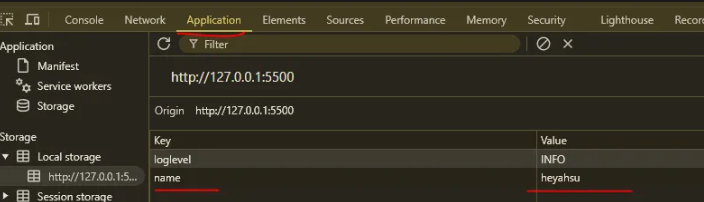
What is allowed
localStorage.setItem('name', 'heyahsu');  // only string allowed
localStorage.getItem('name');  // gives heyashu
localStorage.removeItem('name');
localStorage.clear();
- Size Limit: 5MB per domain (maximum data storage allowed).
- Local Storage operations are synchronous.
- Persistent Storage: Data remains even after closing the tab or window, except in Incognito Mode.
- Only serialized data (strings) are allowed in Local Storage.
- Security Considerations: Do not store sensitive data. Be cautious of CORS and XSS attacks.
- Use Cases: Store user preferences, selected themes, usernames, and basic settings—but never passwords.
- Asset Storage can also be done.
- LocalStorage is not reactive.
Continue Exploring
Request a Topic
Want me to write notes on a course?
Tell me the course, book, or research topic you want covered. If it helps learners, I'll consider adding structured digital notes for it in the garden.
Collaborate
Have a notes collection to feature here?
Do you have open notes you want featured in this digital garden? Let me know — we can collaborate and publish them for learners worldwide.
Having a doubt? Ask a query?