What is process ?

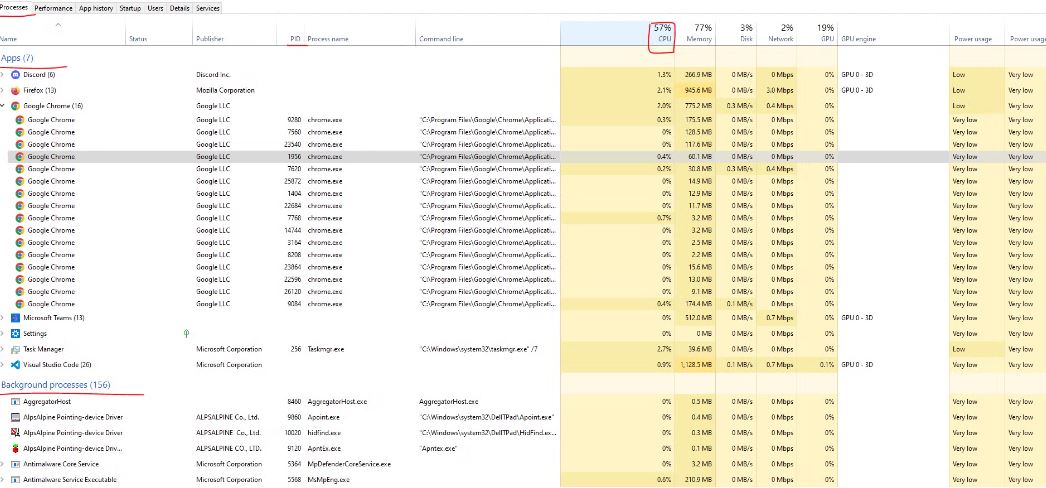
Process ek unit of execution hota hai, matlab ek aisa program, code ka piece ya application jiska apna memory allocation hota hai aur jo processor ko use karke computation yani kuch kaam kar sakta hai. Har process apni life cycle ke dauran alag-alag states se guzarta hai, jaise ready state, waiting state, running state, terminated state, aur sleep state. Ye states process ki current condition ko define karti hain.
Agar aapko ye states dekhni hain ya kisi process ko monitor karna hai, to aap Windows mein Task Manager khol sakte hain, macOS mein Activity Monitor ya Linux mein System Monitor open kar sakte hain.
Har process ki apni ek unique ID hoti hai, jise Process ID (PID) kehte hain.
Ab in sab mein kuch important details jo humne pehle discuss ki hain, jaise Execution Context aur doosri cheezein, wo aapko dikh nahi rahi hongi. Inhe dekhne ke liye aap kuch additional apps install kar sakte hain jo in details ko monitor karne mein madad karte hain. Un apps mein se ek popular app hai Process Explorer.
Is app ko install karke aap har process ki in-depth information jaise CPU usage, memory consumption, aur execution context ka analysis kar sakte hain. Iske alawa, aap htop (Linux ke liye) aur Activity Monitor (macOS ke liye) jaise tools bhi use kar sakte hain.
https://learn.microsoft.com/en-us/sysinternals/downloads/process-explorer
https://processhacker.sourceforge.io/downloads.php : isme windows ka setup download kr lijiye
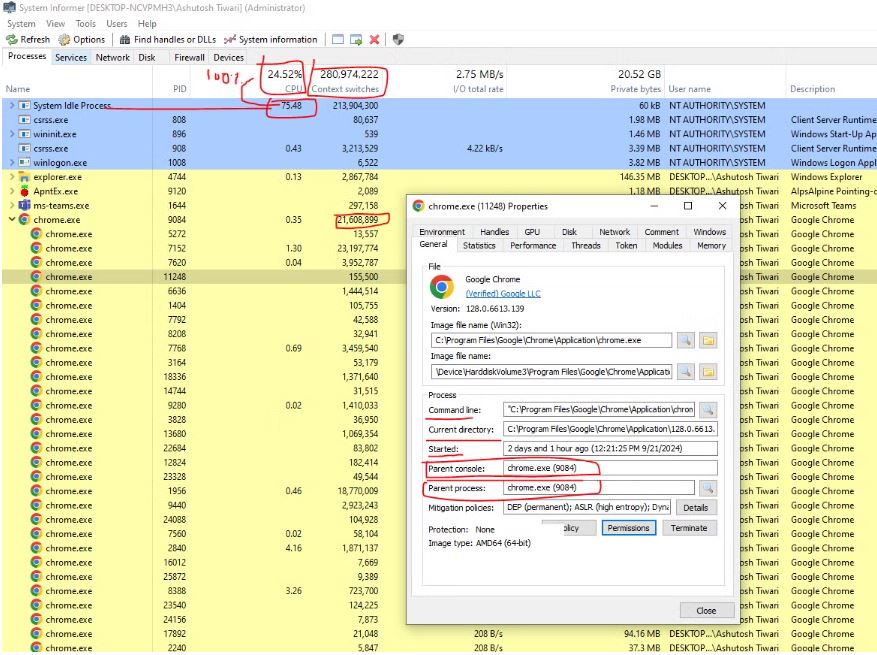
Yaha se aap context switches bhi dekh sakte hain. Kisi bhi subprocess pe click karke jo dialog open hoga, usse aap yeh check kar sakte ho ki uska parent process kya tha aur current process kya hai. Ab ek kaam karte hain, chaliye dekhte hain Node.js ka process kaise hota hai aur kitna CPU aur memory consume karta hai.
Terminal pe jaake node start kar dijiye. Jaise hi aap node start karte ho, wo REPL environment (Read-Eval-Print Loop) ko start kar deta hai, jiska matlab hai aap waha directly commands likh ke unhe execute kar sakte ho.
Ab yaha se hum dekh sakte hain Node.js ka process kaise behave karta hai. REPL : Read-Eval-Print Loop
PS C:\Users\Ashutosh Tiwari\Desktop\node-test> node
Welcome to Node.js v22.2.0.
Type ".help" for more information.
>
Ye screen shot niche dekhiye, hum Node.js ka process observe kar rahe hain, jiska context switch 2004 hai, yaani ki bahut zyada nahi hai. Context switch ka matlab hota hai ki processor kitni baar ek process se dusre process me switch karta hai.
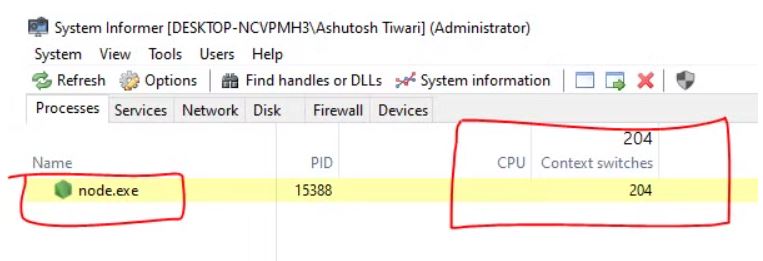
ab aap while(true) ye likh dijiye node js ke terminal me
PS C:\Users\Ashutosh Tiwari\Desktop\node-test> node
Welcome to Node.js v22.2.0.
Type ".help" for more information.
>while(true){}
Node ke REPL, yani terminal me, agar aapne ek infinite loop chal diya, toh ab ye Node.js ki process aapke ek core ko poora use karegi. Ab kya hoga? Mere paas total 8 cores hain, aur ye ek core ko use kar raha hai. Toh kitna percentage hua?
100/8 = 12.5% max, na?
Ab aap niche screen shot me dekhiye, wahi dikh raha hai. Aur ab context switch ka jo number hai, woh count bhi badh chuka hai. Aur bas yahi pura khel hai, ki kaise ek process ek core ko fully utilize kar ke performance ko impact karti hai.

Aap process pe right-click karke uski priority ko "realtime" kar sakte ho, isse ye 12.5% tak pahunch jayega, yani max utilization. Agar aapne aise 8 processes Node ke open kar diye aur unki priority ko realtime kar doge, to aapka system Siachen Glacier ki tarah freeze ho jayega, ekdum jam ho jayega. Phir aap kuchh nahi kar paoge, haha!
4o
Process vairable
Accha iska alawa hamare pass node js env me process variable bhi rahta hai, aap
console.log(process)
// aapko dikhega
  pid: 16328,
  ppid: 23832,
  execPath: 'C:\\Program Files\\nodejs\\node.exe',
  debugPort: 9229,
Aap console ya debugger laga ke process ko check kar sakte ho, aur usme aapko PID (Process ID) aur PPID (Parent Process ID) bhi dikh jayegi.
Aur ab milte hai, lekin isse pehle aapko ek question ka jawab pta karna hai: Node.js single-threaded hai ya multi-threaded? Soch ke jawab do!
Milte hain agle blog mein..
Continue Exploring
Want me to write notes on a course?
Tell me the course, book, or research topic you want covered. If it helps learners, I'll consider adding structured digital notes for it in the garden.
Have a notes collection to feature here?
Do you have open notes you want featured in this digital garden? Let me know — we can collaborate and publish them for learners worldwide.
Having a doubt? Ask a query?