First Line in Node Js
Get all digital notes here


"Chalo ek file text.txt banate hain apne VS Code mein aur waha kuch likhte hain, jaise ki 'hello.'
Uske baad script.js, jo ki text.txt ke bagal mein hi hai, usse run karna hai. Aapko pichhle session mein dekh sakte ho kaise run karein ya fir F5 press karo ya fn + F5 press karo. Haan, debugger lagana mat bhuliye, aur aapko input mil jayega. Output niche code editor mein dekhna hai, aur yaad rakho output debugger console mein hi dikhega."
// create a text.txt file and paste hello
// create a script.js and paste till last console.log

const fs = require('fs');
const text= fs.readFileSync('./text.txt')
console.log("text",text);

console.log("yes file aa gyi ");

//ouput in Debugger console
text Buffer(5) [72, 101, 108, 108, 111, buffer: ArrayBuffer(8192), byteLength: 5, byteOffset: 288, length: 5, Symbol(Symbol.toStringTag): 'Uint8Array']
script.js:9
arg1 =
Buffer(5) [72, 101, 108, 108, 111, buffer: ArrayBuffer(8192), byteLength: 5, byteOffset: 288, length: 5, Symbol(Symbol.toStringTag): 'Uint8Array']
0 =
72
1 =
101
2 =
108
3 =
108
4 =
111
buffer =
ƒ buffer()
byteLength =
ƒ byteLength()
byteOffset =
ƒ byteOffset()
So, abhi aapko buffer mila hai, aur yeh file se related hai, khaane-peene se nahi. Toh yaha dhyan dijiye! Ab yeh buffer kya hai? Actually, yeh wohi file ka data hai jisme jo bhi content present hai. Ab kaise read karein?
Niche screenshot mein diye gaye steps follow kariye. Number 1 pe hover karke ek extension install kijiye, aur fir buffer ko read karte hain.
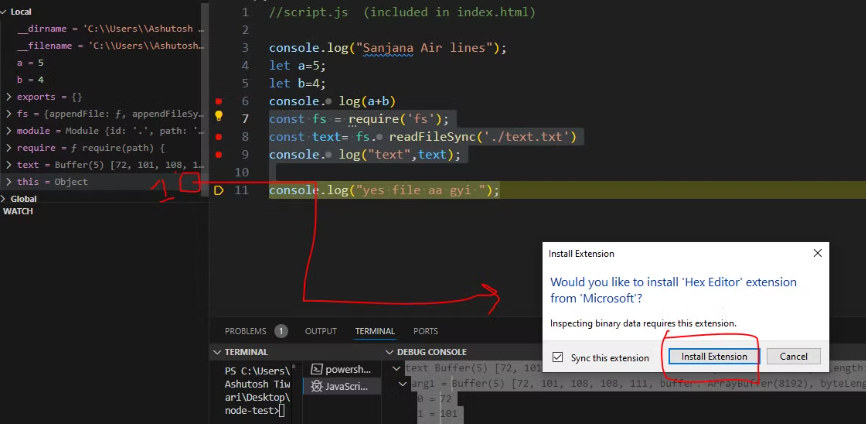
Install aap iss link se bhi kar sakte hain, lekin view tabhi hoga jab aap debug kar rahe honge, yani red mark file ke console pe rakhiyega. Extension installation ke baad yeh result aayega (baad me dekhenge)
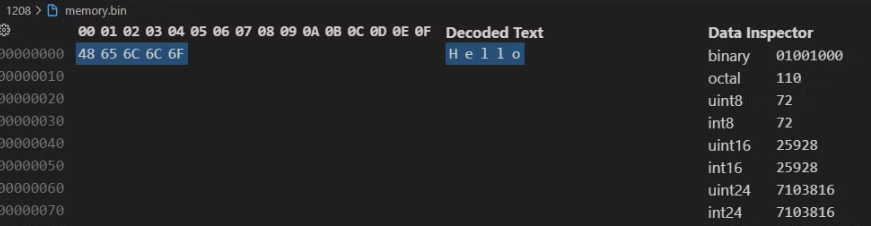
Ab aap itna samjhiye ki aap file read kar paa rahe hain. Kya aap ye simple JS se browser environment mein file read kar sakte hain? Answer is nahiii! Toh ye ek best benefit hai aur power hai Node.js ki, ki using JS, we can read the file. Aur bhi bahut kuchh kar sakte hain, jo hum aage ke session mein dekhenge.
Global Object in Node.js
Jaise browser mein window global variable hota hai, waise hi Node.js mein global naam se global variable hota hai

Confuse ho gaye? Rukiye, main aapko dikhata hoon. Left side VS Code mein aapko 'Run and Debug' option dikh raha hoga, waha Global object dikhai dega. Usko expand karke dekhiye, aapko global object ki sari details dikhengi. Ya fir, aap script.js file mein code likh dijiye, aur terminal open karne ke liye Ctrl + \`` ya Ctrl + J` press kariye, fir likhiye: (Pichle session mein humne ye dekha tha.) Aapko console mein output dikh jayega. Filhaal, main screenshot dono jagah ka niche daal raha hoon.
Iss Global aur window ke baare me english me yaha se padh sakte hain.
console.log(global)

// output
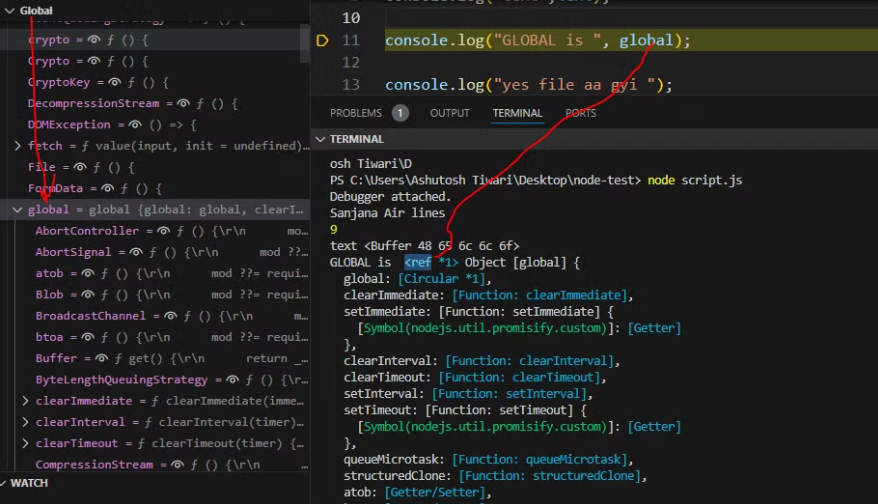
So, yeh jaan lena zaroori hai ki web browsers mein global naam ka koi variable nahi hota, aur window ka concept Node.js mein nahi hai. Haan, community ne ek default variable create kiya hai jo dono environments (browser aur Node.js) mein related content deta hai. Lekin, bas naam same hai, so no confusion.
Ab miltey hain next episode me.
Continue Exploring
Want me to write notes on a course?
Tell me the course, book, or research topic you want covered. If it helps learners, I'll consider adding structured digital notes for it in the garden.
Have a notes collection to feature here?
Do you have open notes you want featured in this digital garden? Let me know — we can collaborate and publish them for learners worldwide.
Reach out on Topmate: topmate.io/aat
Contact to Collaborate