What are Web Rendering Patterns


In this guide, we’ll dive deep into the DOM, how content gets rendered on a web page, how data comes from the server, different rendering types, and more.
Types of Rendering
- Client-Side Rendering (CSR)
- Server-Side Rendering (SSR)
In SSR, there are two key variations:
- SSR (Server-Side Rendering): Content is generated on demand.
- SSG (Static Site Generation): Pages are pre-generated at build time.
A mix of SSR and CSR is known as React Server Components (RSC), a new concept in modern web development.
Client-Side Rendering (CSR)
I’ve written a simple functional component in Next.js that renders a page using CSR. You can observe how everything happens on the client side.
GitHub repo: (link)
import React, { useEffect, useState } from "react";
import Link from 'next/link';

export default function CSRPage() {
  const [videos, setVideos] = useState([]);
  const [loading, setLoading] = useState(true);

  useEffect(() => {
    const fetchVideos = async () => {
      try {
        const response = await fetch('http://localhost:3002/videos');
        const data = await response.json();
        setVideos(data);
      } catch (error) {
        console.error('Error fetching videos:', error);
      } finally {
        setLoading(false);
      }
    };

    fetchVideos();
  }, []);

  if (loading) {
    return <div>Loading...</div>;
  }

  return (
    <div className="container mx-auto p-4">
      <div className="flex justify-between items-center mb-6">
        <h1 className="text-2xl font-bold">Video Tutorials (CSR)</h1>
        <Link href="/ssr-page">
          <button className="bg-blue-500 hover:bg-blue-700 text-white font-bold py-2 px-4 rounded">
            Go to SSR Page
          </button>
        </Link>
      </div>
      <div className="grid grid-cols-1 md:grid-cols-2 lg:grid-cols-3 gap-6">
        {videos.map((video) => (
          <div key={video.id} className="border rounded-lg overflow-hidden shadow-lg">
            <img src={video.image} alt={video.title} className="w-full h-48 object-cover" />
            <div className="p-4">
              <h2 className="text-xl font-semibold mb-2">{video.title}</h2>
              <p className="text-gray-600 mb-2">{video.description}</p>
              <p className="text-sm text-gray-500">Watch time: {video.watchTime}</p>
            </div>
          </div>
        ))}
      </div>
    </div>
  );
}

//
Client-Side Rendering (CSR)
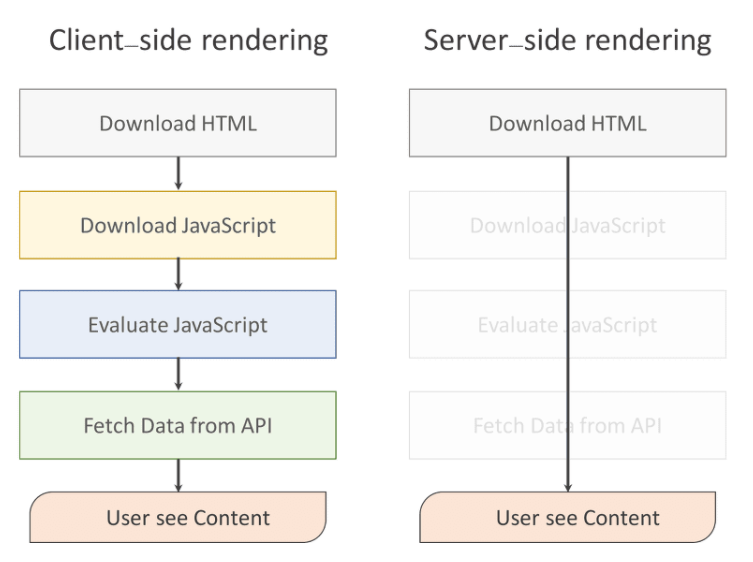
In CSR, the browser first loads the HTML, then fetches CSS, JavaScript, images, and API calls before rendering the page. Hydration happens in between, where event listeners are added to the DOM elements.
A key issue with CSR is that LCP (Largest Contentful Paint) gets delayed since everything loads before the largest content element is painted.

Hydration
In client-side rendering, hydration is the process where a JavaScript framework like React takes static HTML and transforms it into an interactive web page by attaching event listeners and application state to existing DOM elements.
Server-Side Rendering (SSR)
In SSR, everything—HTML, API calls, JS execution, and CSS—is processed on the server. The generated HTML is sent to the browser, making the page appear faster.
However, hydration still happens in the browser, where event listeners are attached to make the page interactive.
import React from "react";
import Link from 'next/link';

export default function SSRPage({ videos }) {
  return (
    <div className="container mx-auto p-4">
      <div className="grid grid-cols-1 md:grid-cols-2 lg:grid-cols-3 gap-6">
        {videos.map((video) => (
          <div key={video.id} className="border rounded-lg overflow-hidden shadow-lg">
            <img src={video.image} alt={video.title} className="w-full h-48 object-cover" />
            <div className="p-4">
              <h2 className="text-xl font-semibold mb-2">{video.title}</h2>
              <p className="text-gray-600 mb-2">{video.description}</p>
              <p className="text-sm text-gray-500">Watch time: {video.watchTime}</p>
            </div>
          </div>
        ))}
      </div>
    </div>
  );
}

export async function getServerSideProps() {
  try {
    const response = await fetch('http://localhost:3002/videos');
    const videos = await response.json();

    return {
      props: {
        videos,
      },
    };
  } catch (error) {
    console.error('Error fetching videos:', error);
    return {
      props: {
        videos: [],
      },
    };
  }
}
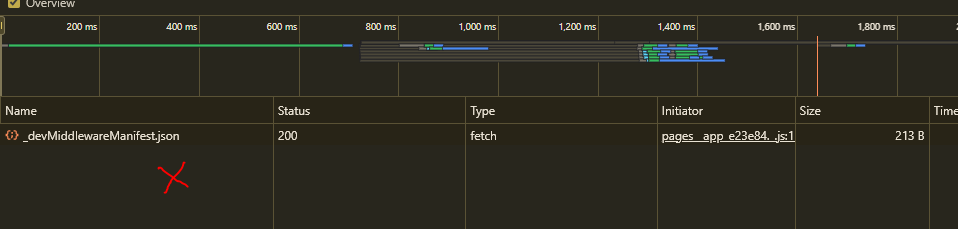
In SSR, you can see the API call, but no image load, as the API is handled on the server, not on the client.
We need to avoid things that take too much time on the first load. If your first page relies on props in SSR and loads after 3 seconds, LCP gets impacted, so be aware.
Static Site Generation (SSG)
SSG is a technique similar to SSR, but instead of generating the page dynamically for each request, it pre-generates and stores the page on the server, serving it directly to the client without rebuilding it.
SSG is best for pages that don't change frequently, like blogs or static content. If data changes frequently (e.g., user-specific data), SSR is a better choice.
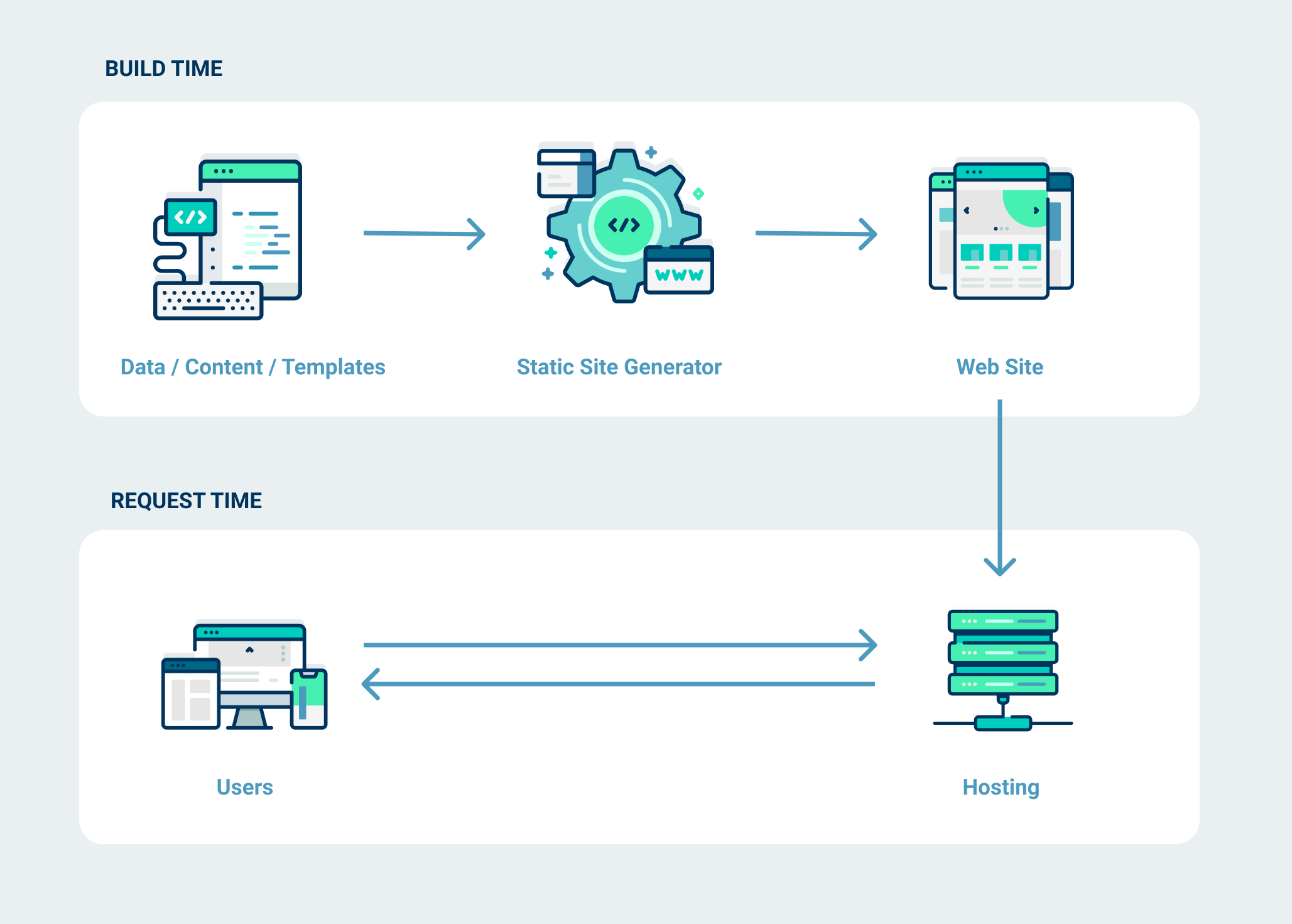
- SSR: Use when data changes dynamically for each request.
- SSG: Use when content is mostly static and doesn't require frequent updates.
In SSG, we use getStaticProps instead of getServerSideProps.
import React from "react";
import Link from 'next/link';

export default function SSGPage({ videos }) {
  return (
    <div className="container mx-auto p-4">
      <div className="flex justify-between items-center mb-6">
        <h1 className="text-2xl font-bold">Video Tutorials (SSG)</h1>
        <Link href="/csr-page">
          <button className="bg-blue-500 hover:bg-blue-700 text-white font-bold py-2 px-4 rounded">
            Go to CSR Page
          </button>
        </Link>
      </div>
      <div className="grid grid-cols-1 md:grid-cols-2 lg:grid-cols-3 gap-6">
        {videos.map((video) => (
          <div key={video.id} className="border rounded-lg overflow-hidden shadow-lg">
            <img src={video.image} alt={video.title} className="w-full h-48 object-cover" />
            <div className="p-4">
              <h2 className="text-xl font-semibold mb-2">{video.title}</h2>
              <p className="text-gray-600 mb-2">{video.description}</p>
              <p className="text-sm text-gray-500">Watch time: {video.watchTime}</p>
            </div>
          </div>
        ))}
      </div>
    </div>
  );
}

export async function getStaticProps() {
  try {
    const response = await fetch('http://localhost:3002/videos');
    const videos = await response.json();
    return {
      props: {
        videos,
      },
    };
  } catch (error) {
    console.error('Error fetching videos:', error);
    return {
      props: {
        videos: [],
      },
    };
  }
}
No matter how much time http://localhost:3002/videos takes, SSG will keep it handy as a built file and serve it without calling the API again. This never happens with SSR because SSR calls everything, including APIs, on each request.
React Server Components (RSC)
In SSR, everything gets rendered on the server. However, in React Server Components (RSC), we decide what to render on the server and what to render on the client—that's the only difference.
Documentation: Understanding React Server Components
To mark a component as a client component, add 'use client' at the top before defining the

Benefits of React Server Components
- Data Fetching – Fetch data directly on the server, reducing client-side API calls.
- Security – Sensitive logic stays on the server, preventing exposure to the client.
- Caching – Server-side caching optimizes performance and reduces redundant requests.
- Bundle Size – Smaller client-side bundle, improving load time.
- Initial Page Load – Faster load times as less JavaScript is shipped to the client.
- Streaming – Allows progressive rendering, improving perceived performance.
- SEO – Pre-rendered content improves search engine indexing.
I will create a proper repo for server components in the future. Meanwhile, you can keep checking or learn from YouTube or articles.
Continue Exploring
COLLECTION
Chapter 4: Hoisting
Continue exploring notes from the digital garden.
COLLECTION
Welcome to the Namaste AI Notes
Welcome to Namaste AI Notes — free digital notes for Akshay Saini’s Namaste AI course. Mission, roadmap, study habits, and how to get the most from these open-source notes on heyashu.
Want me to write notes on a course?
Tell me the course, book, or research topic you want covered. If it helps learners, I'll consider adding structured digital notes for it in the garden.
Have a notes collection to feature here?
Do you have open notes you want featured in this digital garden? Let me know — we can collaborate and publish them for learners worldwide.
Having a doubt? Ask a query?