Introduction to Web hooks


This is another technique used for real-time communication, commonly used in applications without being noticed. We use multiple services, and one such service is Webhooks. In this blog, we’ll understand Webhooks using the example of payment processing—how a payment is initiated from the browser and the confirmation received.
Polling vs Webhooks in Payment Processing
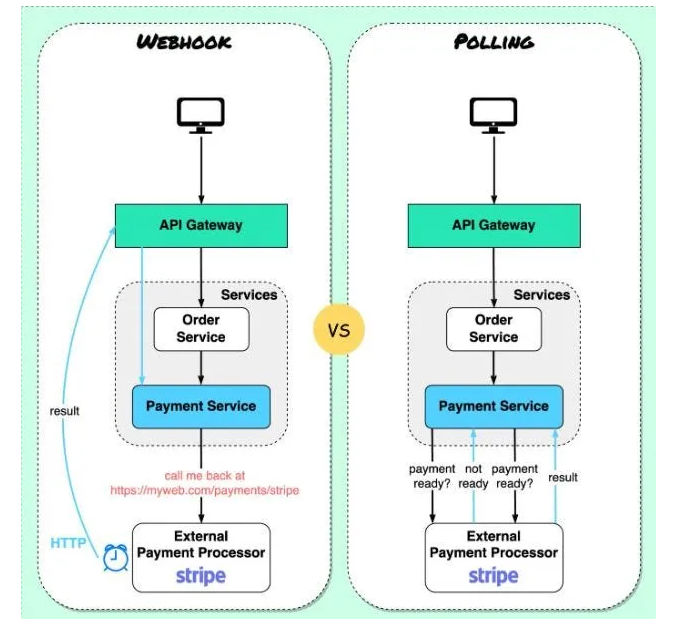
Below is a screenshot comparing Polling and Webhooks for handling payments. Both methods are used for payment processing, but let’s first discuss Polling.
Polling
In the polling method, API requests are sent to a payment service to check if the payment is processed, completed, or failed. The challenge with polling is that it’s a repetitive process, constantly checking for payment status, leading to unnecessary API calls.
This results in wasted resources as the server checks repeatedly, even when there’s no update, causing blocking and waiting. It’s an inefficient way to handle requests.
For more on Polling, read here: Practical Guide to Long Polling.
Webhooks offer a more efficient solution, notifying in real-time whenever the status changes. Stay tuned to learn more about how Webhooks solve this problem
Webhooks
Webhooks are a way for applications to communicate with each other in real-time by sending data over HTTP. They are triggered by specific events, such as a payment transaction. In this example, we provide a callback to a third-party service, which calls you back once the job is done. It’s an event-driven mechanism where webhooks know when to call and what methods to invoke, depending on the status.
There is also a retry mechanism for verification and acknowledgment.
Things to Remember
- Real-time communication
- Event-driven
- POST REST API
- Payload, authorization, and secret key
- Retry, verification, and acknowledgment
Usage
- Notification systems
- Data synchronization (performing other tasks once the main work is done)
- Automation (For example, on GitHub, once you push to the main branch, a mail is generated for deployment. This is all possible because of webhooks, or we can say webhooks are used behind the scenes.)
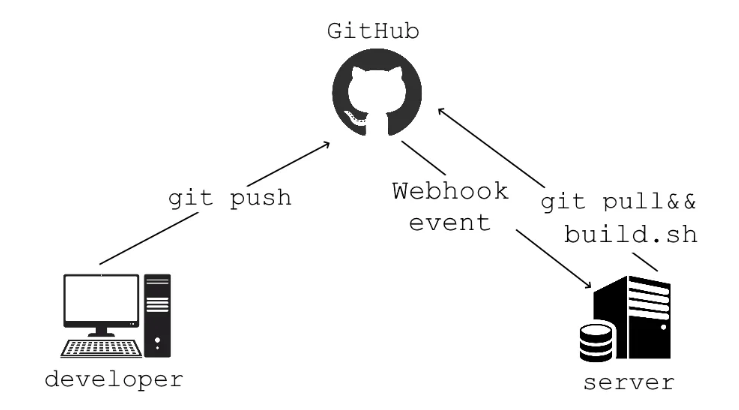
If you visit the GitHub Webhook page, you will see a similar definition:
Webhooks provide a way for notifications to be delivered to an external web server whenever certain events occur on GitHub. You can add a webhook after watching some tutorials on Google.
If you want to create a webhook in Node.js or enable something on GitHub, you can try it. But for now, I’m stopping the writing. We’ll meet in another blog. See you, bye-bye!
Want me to write notes on a course?
Tell me the course, book, or research topic you want covered. If it helps learners, I'll consider adding structured digital notes for it in the garden.
Have a notes collection to feature here?
Do you have open notes you want featured in this digital garden? Let me know — we can collaborate and publish them for learners worldwide.
Having a doubt? Ask a query?